Try it Features Curriculum Pricing FAQ Blog ๐Ÿ“ฒ Free download on App Store
๐ŸŽ’ Half Term Offer
2 weeks free with code HALFTERMHELP
Ends in --d --h --m --s
Download free โ†’

๐ŸŽ’ Half term: 2 weeks free with HALFTERMHELP

Download free โ†’

๐Ÿ“ฒ Send to your child's iPad

Browsing on your phone? Send yourself the download link so it's easy to install on the right device.

โœ“ Sent! Check your device for the link.

Link goes to the App Store. Free to download.

๐ŸŽ‰ Live on the App Store ยท 4.9 โ˜… ยท 7-day free trial

Learn first,
earn screen time

โ˜…โ˜…โ˜…โ˜…โ˜… 4.9 ยท "Brilliant app" on App Store

Learning Block locks your child's iPad until they complete a UK curriculum-aligned maths quiz. No quiz, no screen time. It's that simple.

โœจ Install on your child's iPad โ€” takes 2 minutes to set up

iPad locked, complete a quiz to unlock
Screen time earned, 29 minutes remaining
What parents are saying

Real families. Real results.

โ˜…โ˜…โ˜…โ˜…โ˜… 4.9 on the App Store
โ˜…โ˜…โ˜…โ˜…โ˜…

With growing grandchildren, their desire to get onto the iPad is increasing by the day. Learning Block gives us control, with the super advantage that the kids have a strong desire to work out the maths questions. It's a win win.

Tim App Store review ยท "Game changer"
โ˜…โ˜…โ˜…โ˜…โ˜…

I feel like we've got control back over screen time with our youngest. There are far fewer outbursts over the iPad, and it's become part of his routine. His quick maths is improving by the day!

Dom App Store review ยท "Brilliant App for Kid's Learning"
โ˜…โ˜…โ˜…โ˜…โ˜†

Was sceptical about downloading this at first, but we've got it on my daughter's iPad and it's made it easy to apply screen time settings. Much easier than setting up Apple Screen Time. The questions to unlock the iPad are exactly what she's learning in school. Daughter is in Year 2.

KazLouise12 App Store review ยท "Works surprisingly well!"
โ˜…โ˜…โ˜…โ˜…โ˜…

The children actually love the maths quiz more than using the iPad. Really good fun way to regulate and enhance their screen time. Highly recommended.

Sherlock16* App Store review ยท "Genius"

See how it works

1

iPad gets locked

Apps are blocked at OS level with no workarounds. Your child sees the Learning Block screen.

2

Complete the quiz

Curriculum-aligned maths questions. Answer enough right to pass. Too many wrong answers and they try again.

3

Earn screen time

Beat the quiz and the iPad unlocks with earned screen time. When time's up, it locks again until the next quiz.

๐Ÿ‘ˆ Tap through the demo to try it yourself

Everything you need
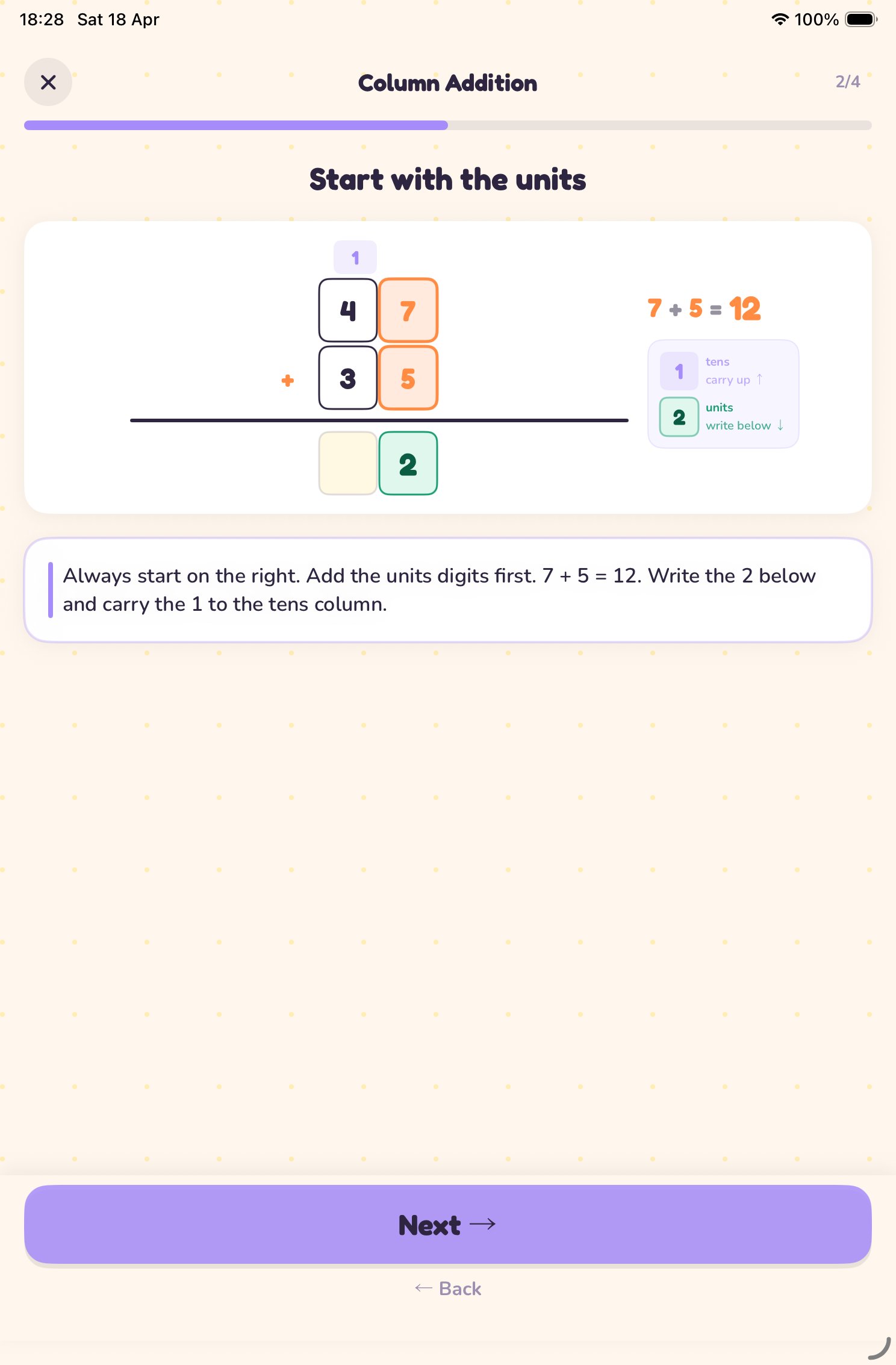
Column addition walkthrough
๐Ÿ“–

Learn it before they're tested on it

Every topic has animated, step-by-step walkthroughs that teach the method before your child faces the quiz. Visual diagrams, worked examples, and clear explanations, all at their own pace.
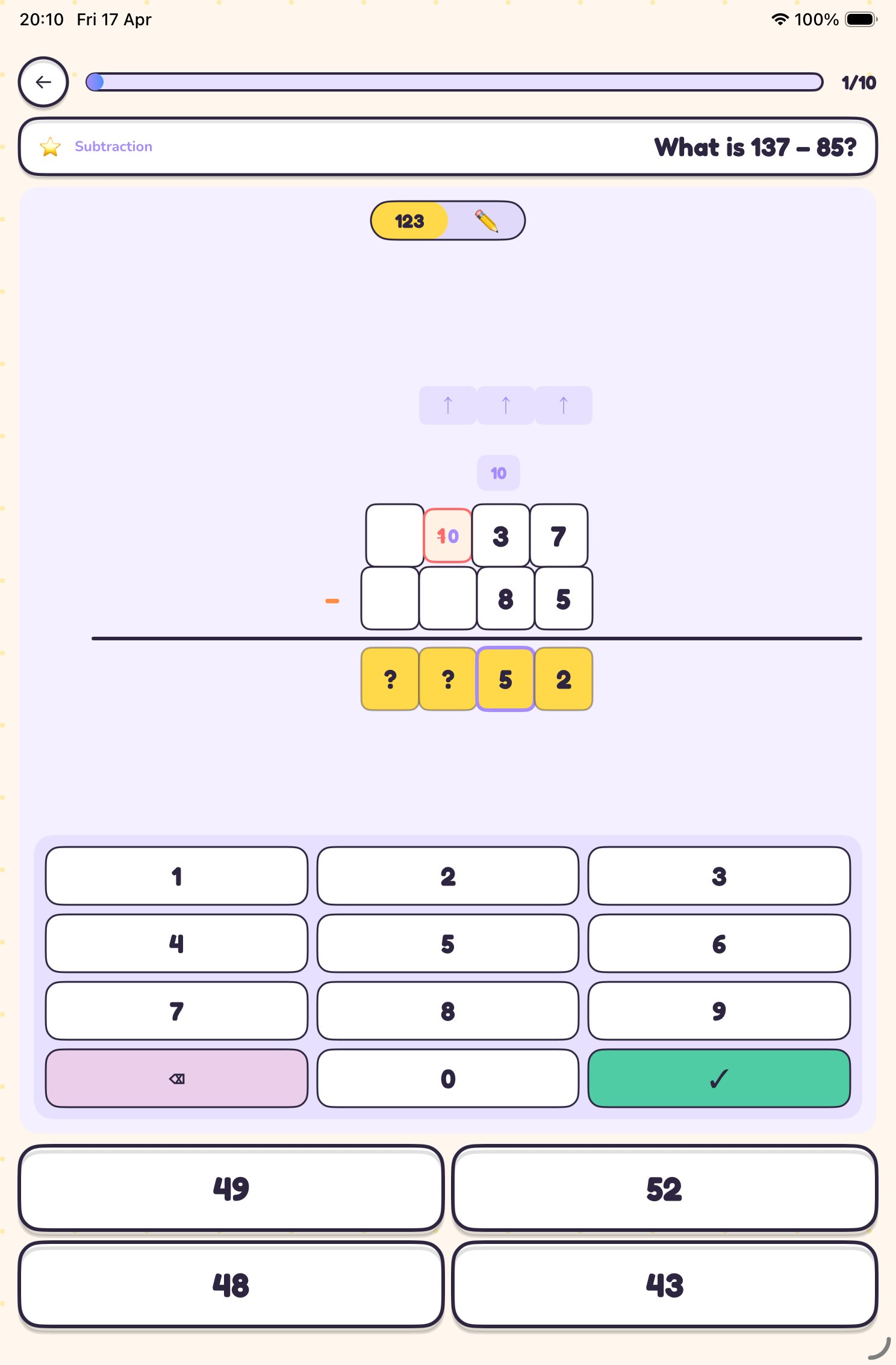
Column method subtraction
โœ๏ธ

Work it out. For real

Column method, borrowing, and a drawing pad so children can show their working. They learn the method, not just the answer.
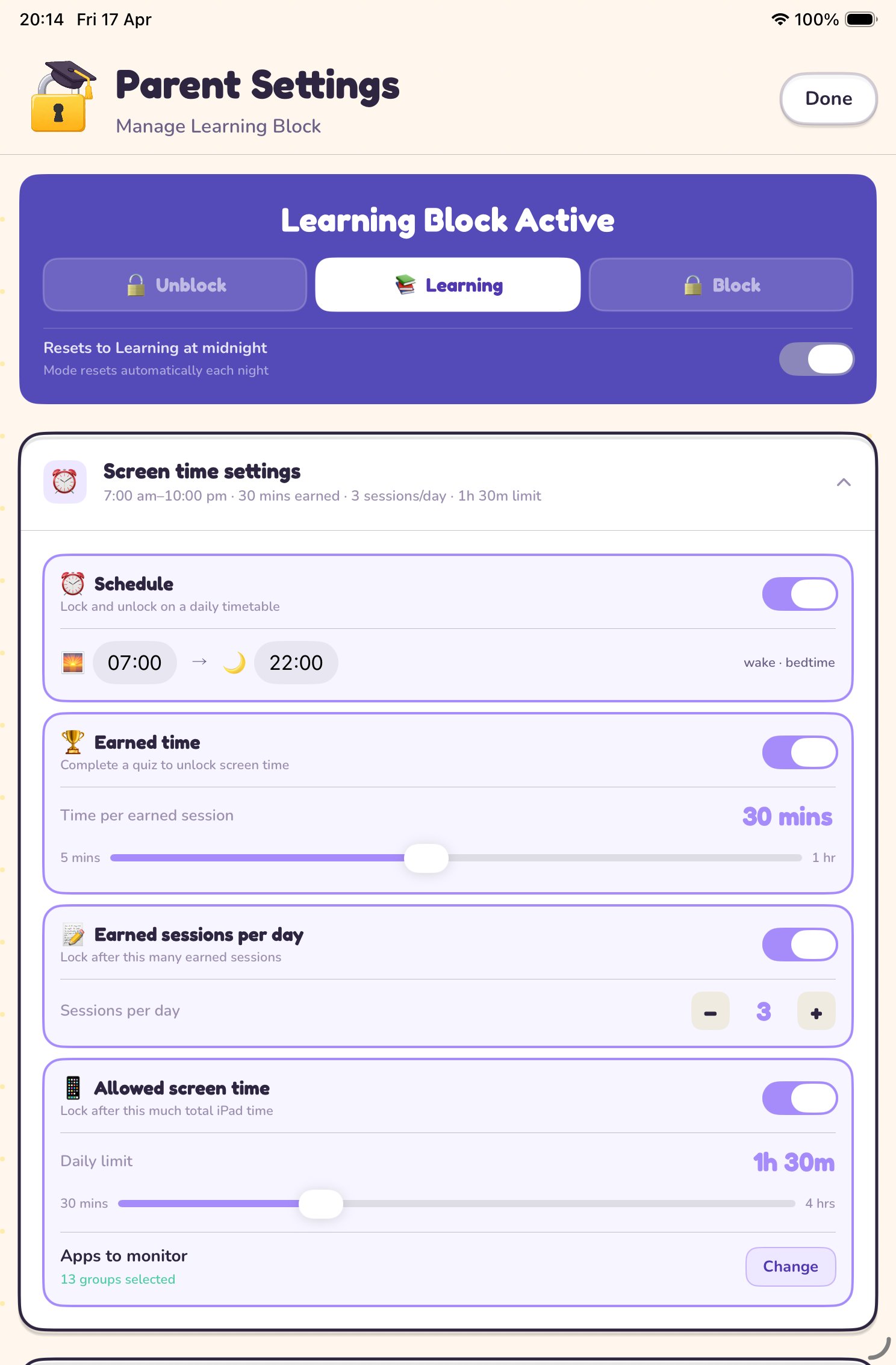
Parent settings
โš™๏ธ

You set the rules

Schedule, screen time limits, earned sessions, daily caps, all in your hands. Set a bedtime and a wake time. The iPad locks automatically and stays locked until the morning quiz is done.
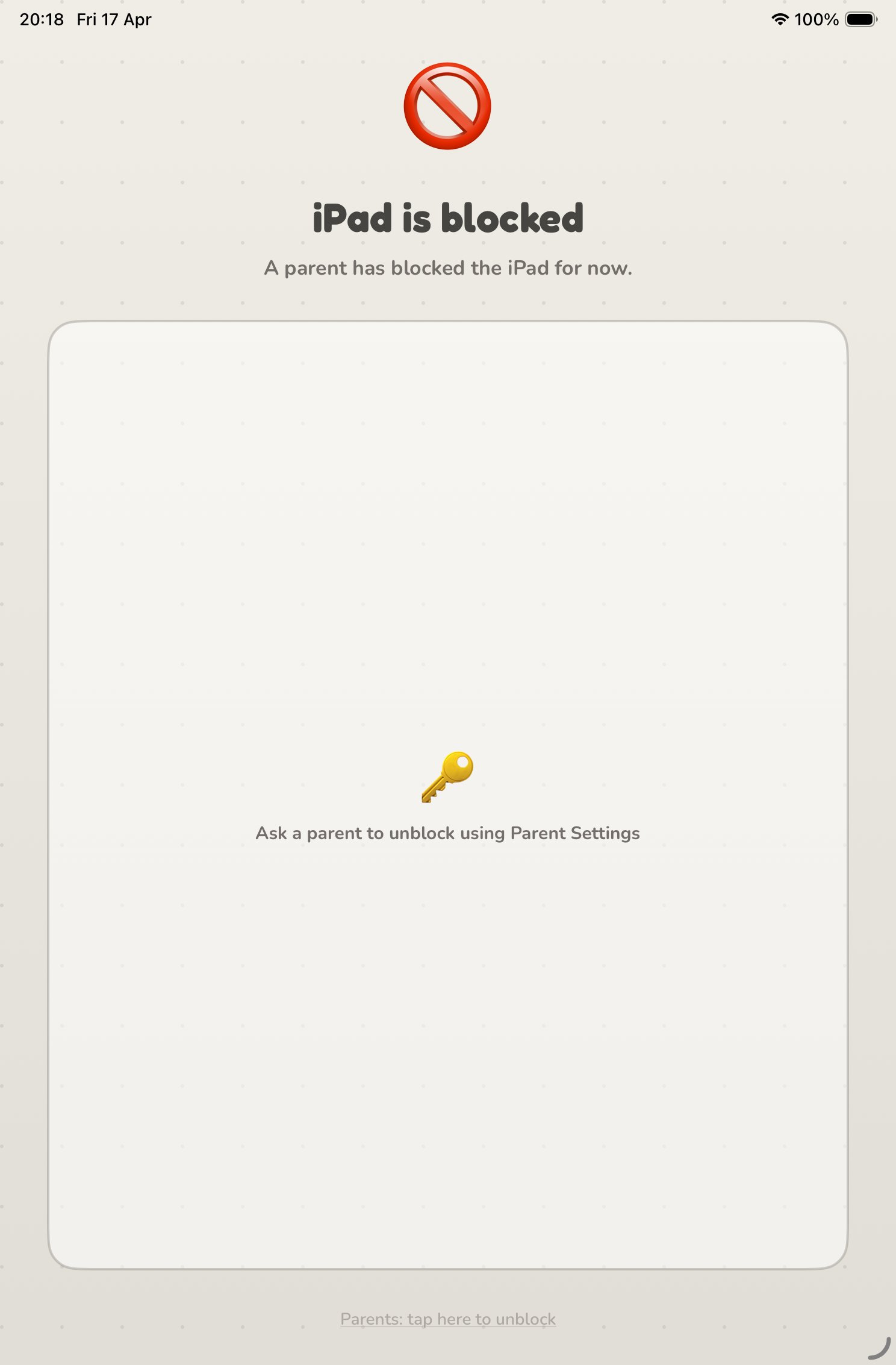
iPad blocked
๐Ÿ”

They can't get around this one

Uses Apple Screen Time to lock the entire iPad at OS level, not just the app. No workarounds, no way out. When Learning Block says locked, it means locked.

๐Ÿ“š

Curriculum-aligned

Questions from the UK National Curriculum for KS1 and KS2, with infinite variety.

๐Ÿ“Š

Parent dashboard

Per-topic accuracy, quiz history, and daily streaks. See exactly which areas need attention, all in a PIN-protected settings panel.

๐Ÿ†

Collections & badges

80 milestones, 20 tiered badges, and 8 themes to unlock as your child progresses.

๐Ÿ“ฑ

Lock screen widget

Glance at the home screen to see if it's locked, unlocked, or counting down.

๐ŸŒ™

Bedtime schedule

Locks at night, stays locked until the morning quiz. Automatic, every day.

๐Ÿšซ

No ads, ever

No adverts, no distractions, no social features. Just maths, learning, and screen time earned.

Matched to your child's year group

Addition to angles, fractions to decimals. Every topic they cover in class, from Year 1 to Year 6.
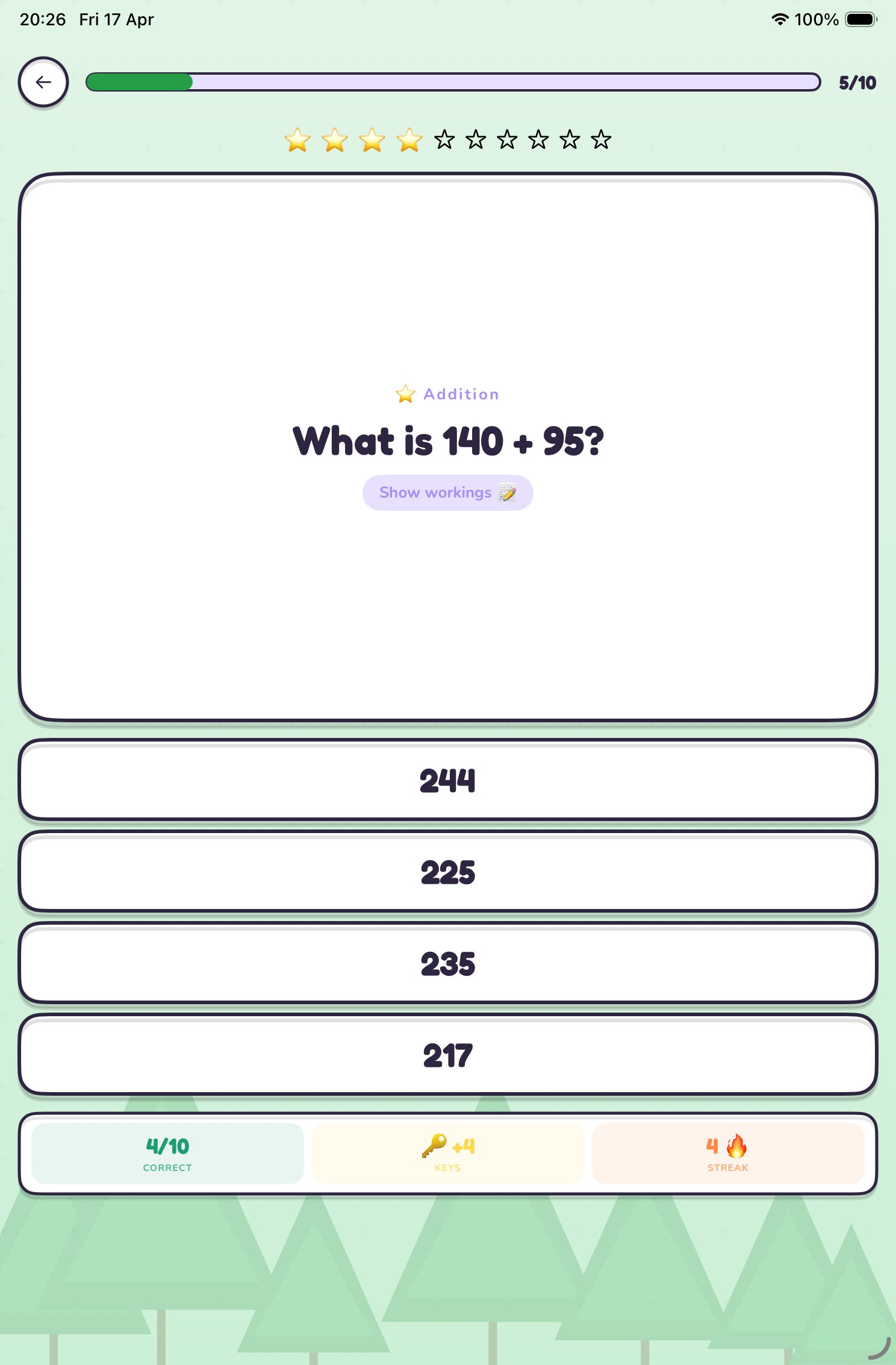
KS1 and KS2 addition question
Year 1โ€“2

Ages 5โ€“7

  • โž• Addition
  • โž– Subtraction
  • โœ–๏ธ Multiplication
  • โž— Division
  • ยฝ Fractions
  • ๐Ÿ”ท Shapes
  • ๐Ÿ• Time
  • ๐Ÿ”ข Place Value
Year 3โ€“4

Ages 7โ€“9

  • โž• Addition
  • โž– Subtraction
  • โœ–๏ธ Multiplication
  • โž— Division
  • ยฝ Fractions
  • ยท Decimals
  • ๐Ÿ”ท Shapes
  • ๐Ÿ• Time
  • ๐Ÿ”ข Place Value
Year 5โ€“6

Ages 9โ€“11

  • โž• Addition
  • โž– Subtraction
  • โœ–๏ธ Multiplication
  • โž— Division
  • ยฝ Fractions
  • % Percentages
  • ยท Decimals
  • ๐Ÿ“ Area & Perimeter
  • ๐Ÿ“ Angles

Start free.
Upgrade anytime.

Try the full app free for 7 days. No payment required. If you don't upgrade, your account simply stays on the free tier automatically.

Free

ยฃ0
forever
KS1 Addition ยท 5 questions
Try before you buy

Monthly

๐ŸŽ 7-day free trial
ยฃ3.99
per month
Try free for 7 days. Drops to free tier automatically if you don't continue

No payment required. After 7 days, decide if you want to continue. If not, your account stays on the free tier automatically.

Got questions?

Everything you need to know, grouped by topic. Full help centre โ†’

๐Ÿš€ Getting Startedโ–พ
Which device does Learning Block go on?
Learning Block goes on your child's iPad, not your own phone. Once installed, you set it up with your parental PIN and it works automatically. Takes about 2 minutes to configure.
What's the difference between free and premium?
Free: KS1 Addition only, 5 questions per quiz, 1 quiz per day. Premium: All year groups (Year 1 to 6), all topics, configurable quiz length, pass mark and difficulty, bedtime schedule, earned time, daily caps, the full Learn section with walkthroughs, and the complete badges & collections system. New users get 7 days of full premium free, no payment details needed.
Is it available on Android or Amazon Fire?
iPad only for now. Learning Block relies on Apple's Screen Time API for the OS-level lock, which isn't available on other platforms.
๐Ÿ” Lock & Securityโ–พ
What if my child knows the Screen Time passcode?
Learning Block uses a separate parent PIN that your child never sees. As long as your Screen Time passcode is private, there's no way to bypass the lock.
What if my child deletes the app?
If Learning Block is deleted, the lock is removed. To prevent this, go to Settings โ†’ Screen Time โ†’ Content & Privacy Restrictions โ†’ Deleting Apps โ†’ Don't Allow. This is protected by your Screen Time passcode.
Can I fully block the iPad, not just quiz-lock it?
Yes. Switch to Block mode and the device is completely locked. Your child can't quiz their way out. Only a parent can unlock it. Switch to Unblock for full free access when you want.
โฐ Schedule & Screen Timeโ–พ
What happens when screen time runs out?
The iPad locks again automatically. Your child needs to complete another quiz to earn more time. You control how much each quiz earns (5โ€“60 minutes), how many quizzes they can do per day, and a total daily screen time cap.
How does the bedtime schedule work?
Set a wake time and a bedtime. The iPad locks at bedtime automatically and stays locked until wake time the next morning, when your child will need to complete a quiz before using it.
Can I temporarily unblock the iPad without changing all my settings?
Yes. Switch to Unblock mode for full access, then toggle on Resets to Learning at midnight and it automatically switches back to quiz-lock at midnight without you having to remember.
๐Ÿ’ณ Subscriptionโ–พ
Does the free trial need a credit card?
No. The 7-day free trial needs no payment details. After 7 days it drops to the free tier automatically. No charges, no surprises.
Can I use it on more than one iPad?
Your subscription is tied to your Apple ID and can be used on any device signed into that account. Each device keeps its own settings and progress independently.
Do you offer school or teacher pricing?
Yes. Free premium codes for teachers and batch codes for schools. Email hello@learningblock.app and we'll set you up.
๐Ÿ”’ Privacyโ–พ
What data do you collect?
None. All quiz data, child profiles, and settings are stored locally on the device. No data is sent to any server. No accounts, no analytics, no tracking, no ads. Ever.

More questions? Visit the full help centre or email hello@learningblock.app
Try it free today

Download free and try the full curriculum for 7 days. No payment required. Take your time, then decide. If you don't upgrade, you simply stay on the free tier.

Download on the App Store

๐Ÿ†“ Free to download ยท 7-day trial ยท no payment required

No spam. Unsubscribe anytime. Privacy policy